Home · Blog · The Same Room Test
We gave 6 AI design apps the same bedroom. Only three gave us a bedroom.
One empty room. Six apps. Three runs each. The same request every time — bedroom, modern. Two apps handed back a living room. One handed back the empty room again. Here is every image, including ours.
The short answer
We uploaded one empty room to six AI interior design apps, ran each of them three times, and asked for the same thing every time: a modern bedroom. This is the easiest version of the job — there is no existing furniture to work around, just an empty box with a wood floor and a window.
Three of the six did not return a bedroom at all. Home AI and Remodel AI both returned a living room with sofas. Interior AI returned the empty room essentially unchanged — no bed, no furniture of any kind.
Of the three that did return a bedroom: DecorIn kept the room's original wood herringbone floor across all three runs. DecAI produced the best-looking single image but lightened the floor. Decor returned a bedroom but a visually busier one, and was the slowest app we tried.
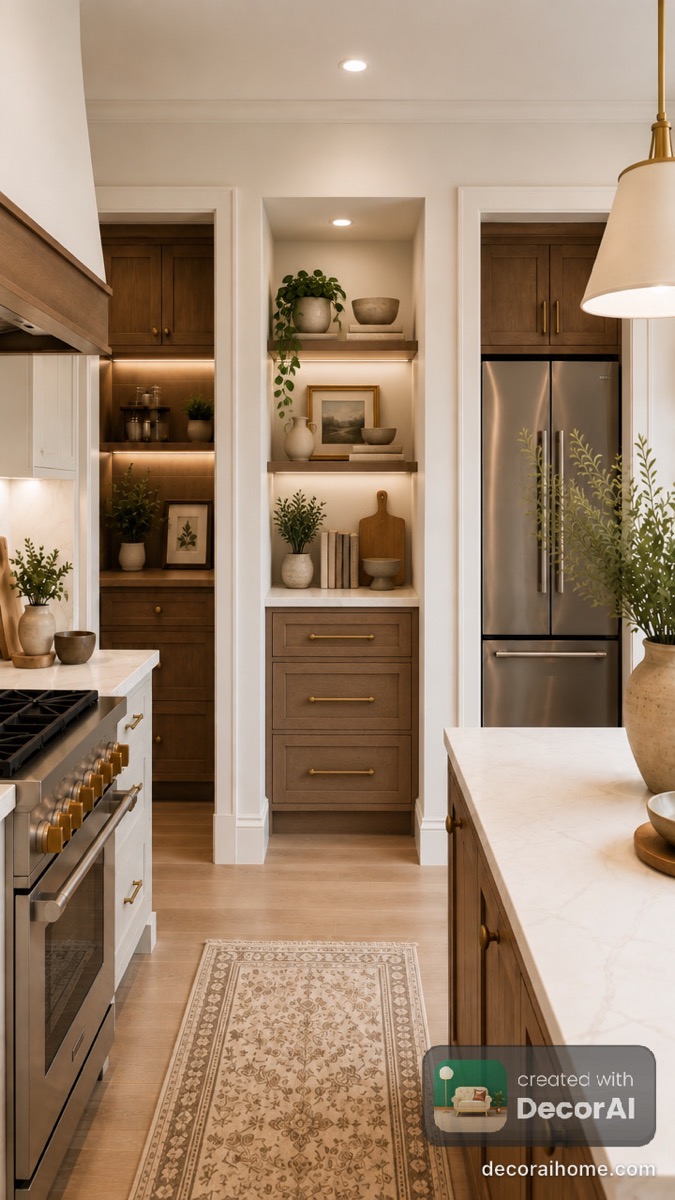
Round 2 found something bigger. We gave the same apps a kitchen with one empty alcove and asked for a pantry in it. Two restyled the whole kitchen and left the alcove empty. One replaced the kitchen entirely. The reason is simple: for most of these apps, editing one area is not a feature — whole-room regeneration is the only lever they give you. DecorAI was the honourable exception and did fill it.
We make DecorIn. We are telling you that up front, and we have written down what it got wrong below. This is round one on a single room — read it as one data point, not a verdict.
The room we uploaded
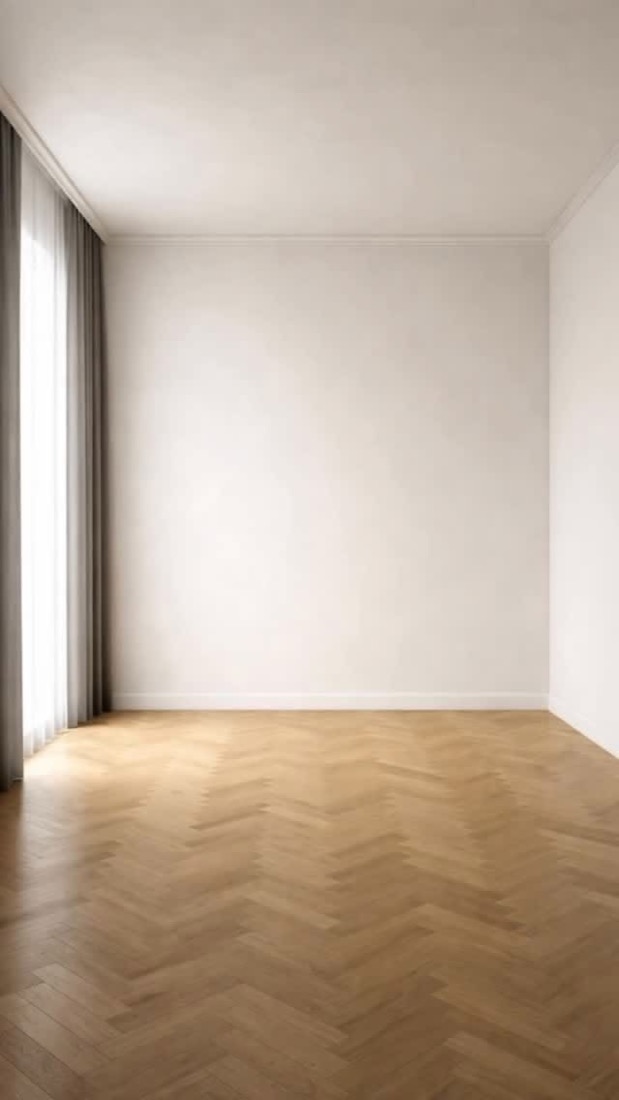
Every app got this exact photo and the same instruction: make it a modern bedroom.
It is worth being clear about how easy this job is. The room is already empty. There is no existing sofa to remove, no clutter to work around, no awkward angle. An app only has to do two things: put a bed in the room, and leave the walls, window and floor where they are.
Three of the six could not do both.
The rules, written down before we started
Every "best AI interior design app" list on the internet is published by a company that sells one of the apps, and in every one of them that company finishes first. We are also a company that sells one of the apps. So instead of asking you to trust a score, here are the rules we fixed in advance and the raw images, so you can disagree with us.
- One photo. The same empty room went into all six apps — the one above, unedited.
- One request. Room type Bedroom, style Modern, every time. No extra prompting, no tweaking of settings.
- Three runs per app. Each app was run three times on that photo. The images below are representative results, not one unlucky attempt — which matters, because the failures you are about to see are not flukes.
- No cherry-picking against anyone. Where an app produced a stronger result than the one shown, we say so in its caption.
- Nothing retouched. Watermarks left on. Nothing cropped to flatter anyone.
The apps tested: Home AI, Remodel AI, Interior AI, Decor, DecAI and DecorIn. All were used on their standard free path in September 2026.
Every result, unedited
The three that did not return a bedroom
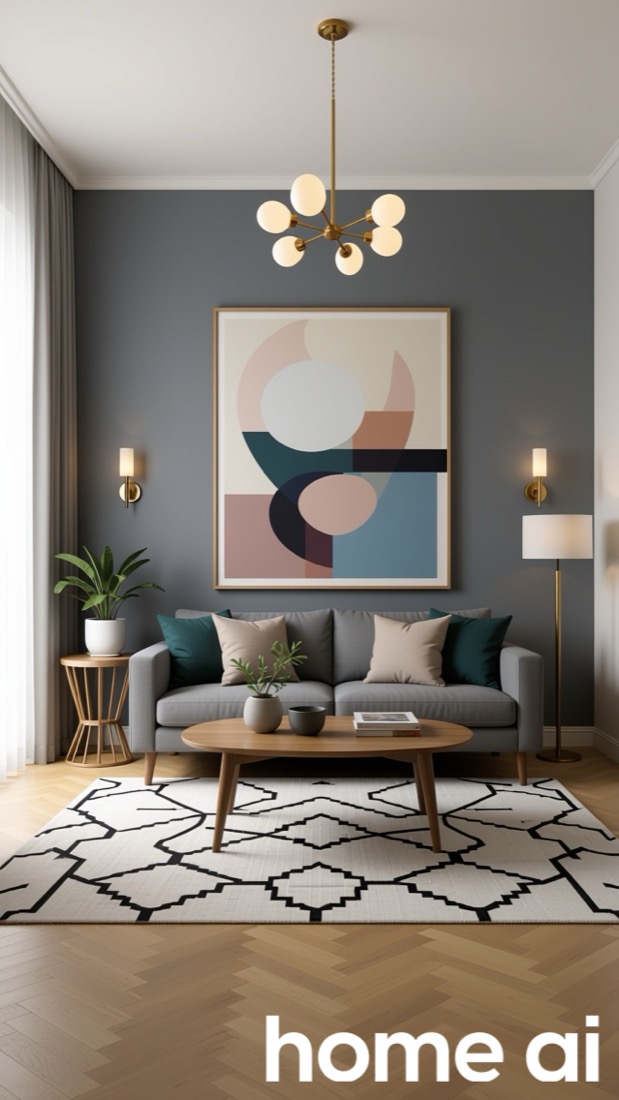
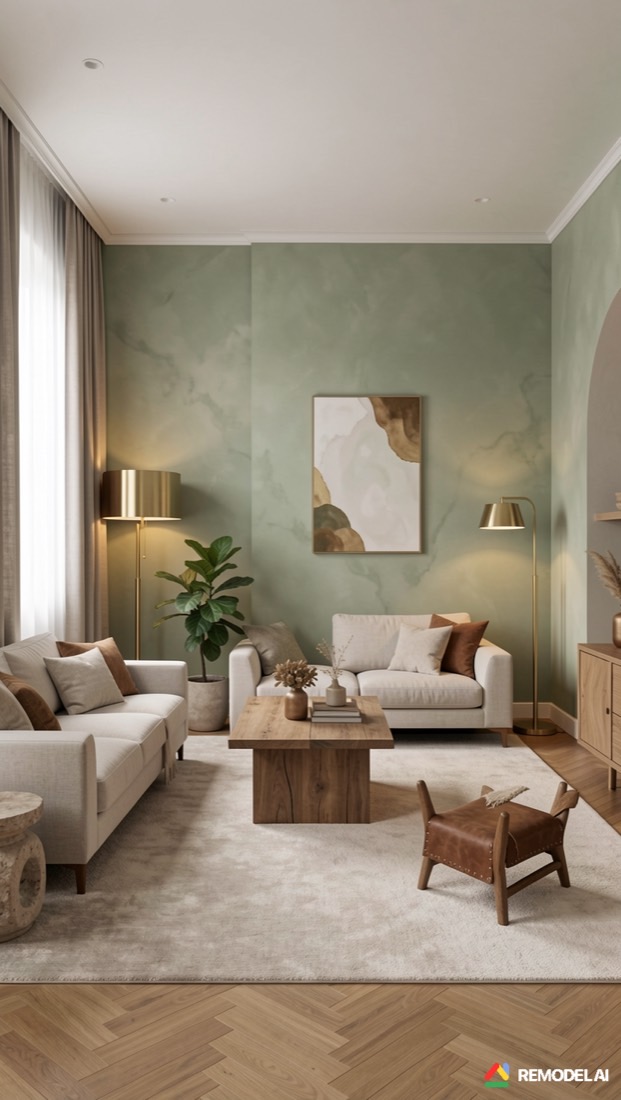
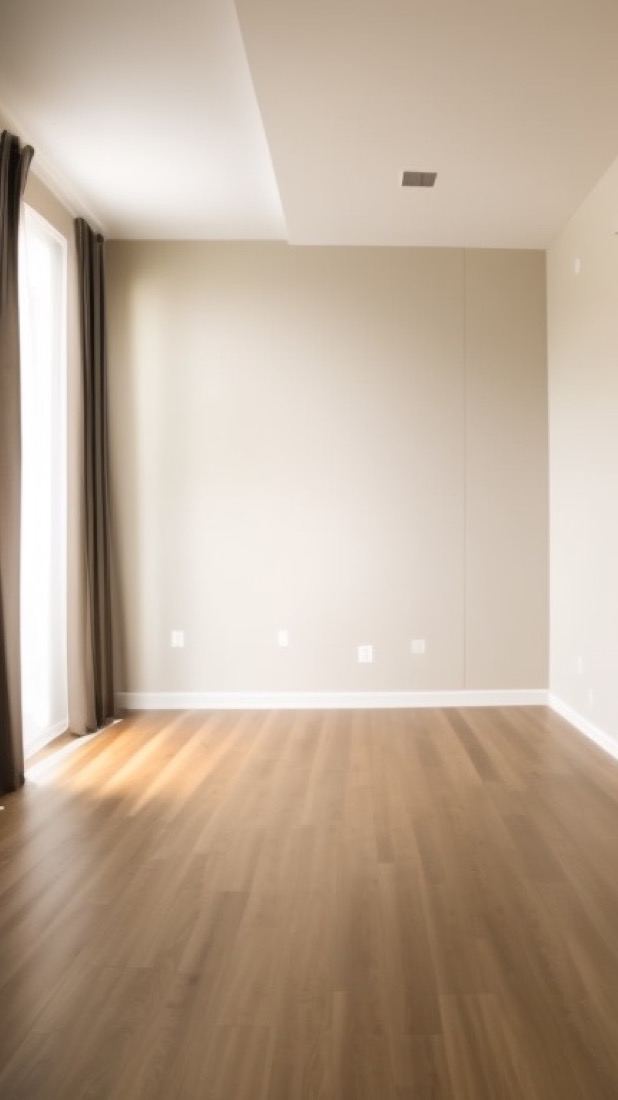
Proof of what we asked for
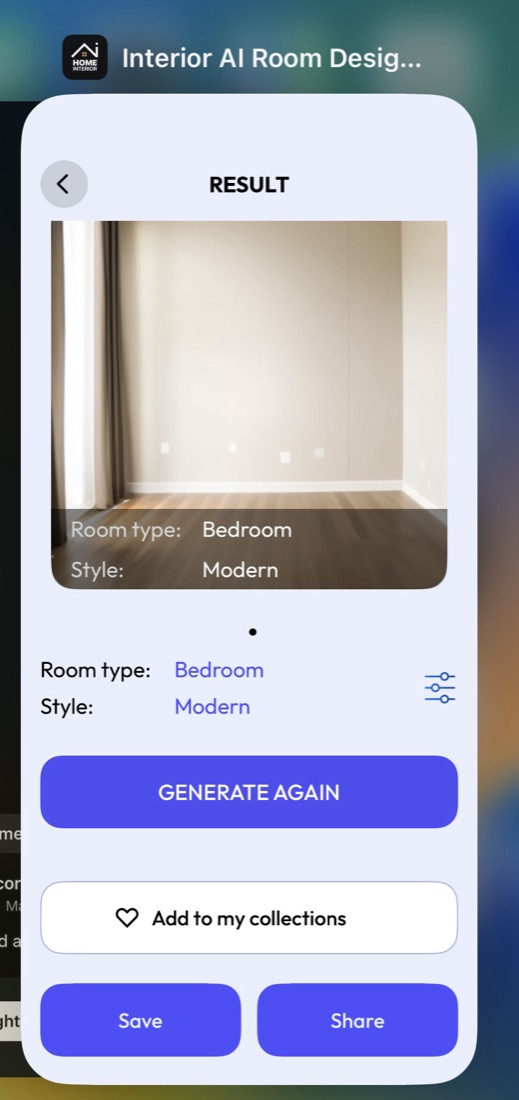
We are including this screenshot because the obvious objection to a test like this is "you must have asked it for the wrong thing."
Here is the app's own result screen showing the settings it ran with: Room type: Bedroom. Style: Modern. The image it produced under those exact settings is the empty room we uploaded, with no bed in it.
This is a first-run result on default settings — the same thing a new user would see.
Home AI, second run
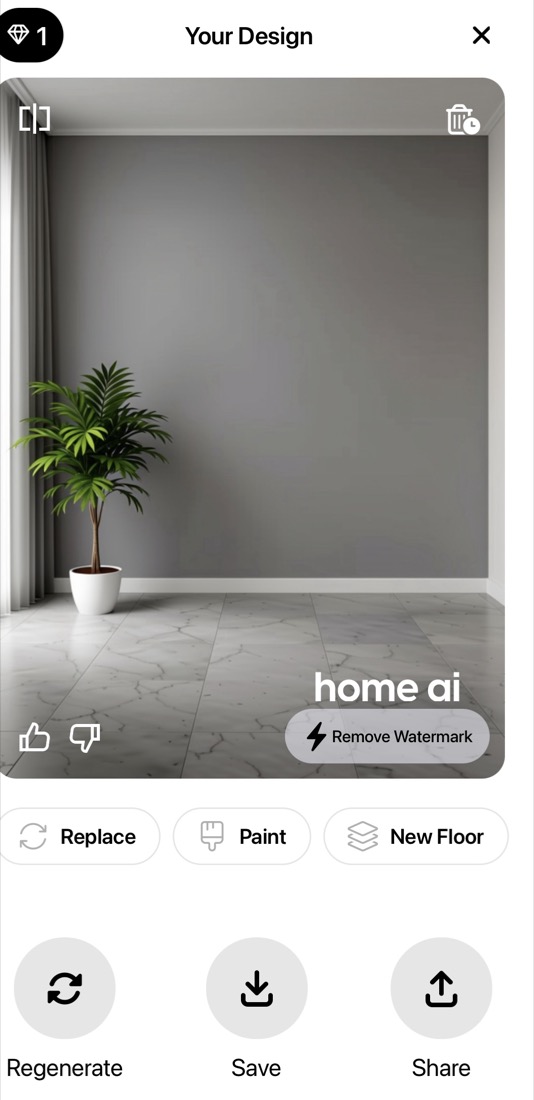
Home AI's second attempt did not produce a living room this time. It produced a gray wall, a single plant, and a completely different floor — the warm wood herringbone replaced with white marble tile.
Note the buttons underneath it in the app: Replace, Paint, New Floor. Changing the floor is a headline feature here, not an accident. That is a legitimate product choice — it is just the opposite of what someone who already lives in the room usually wants.
Also worth noting for anyone comparing free tiers: the result arrives watermarked, with a Remove Watermark button attached to it.
We want to be fair about what this does and does not prove. These apps are not incapable of producing a bedroom — with more prompting, more attempts or a different photo, any of them may well do it. But across three runs each, on an empty room, with the room type set explicitly to Bedroom, this is what they handed back. That is a real cost: it burns free credits, it burns patience, and for a first-time user it is often the moment they delete the app.
The three that returned a bedroom
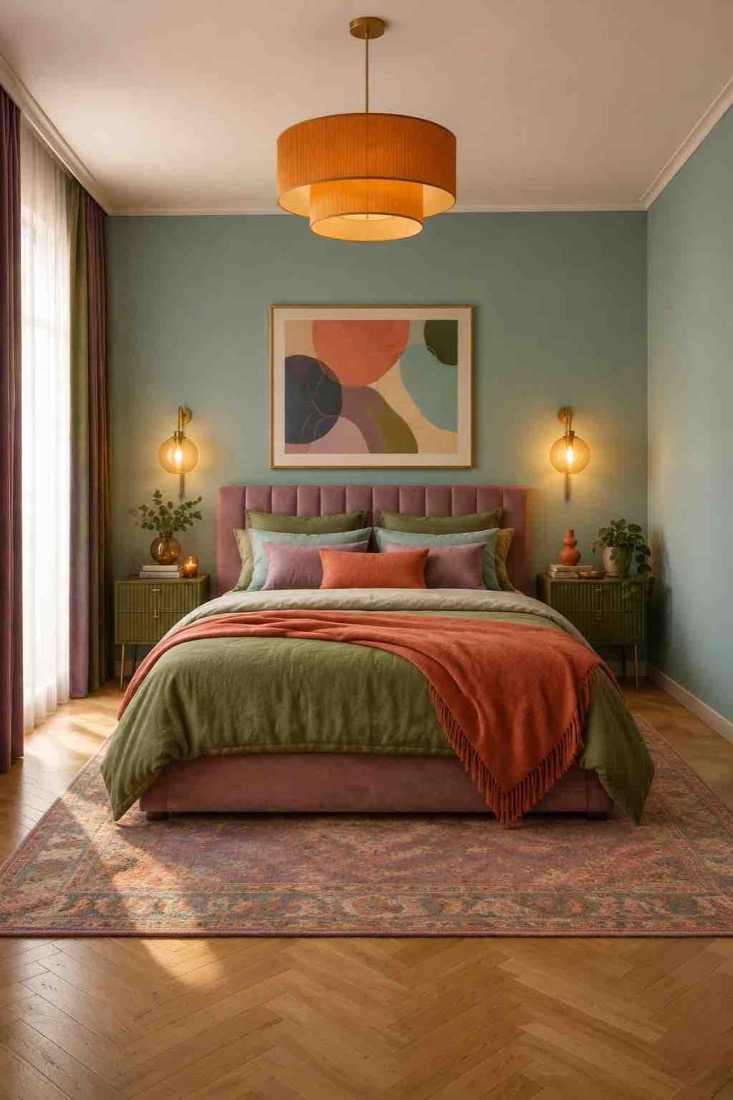
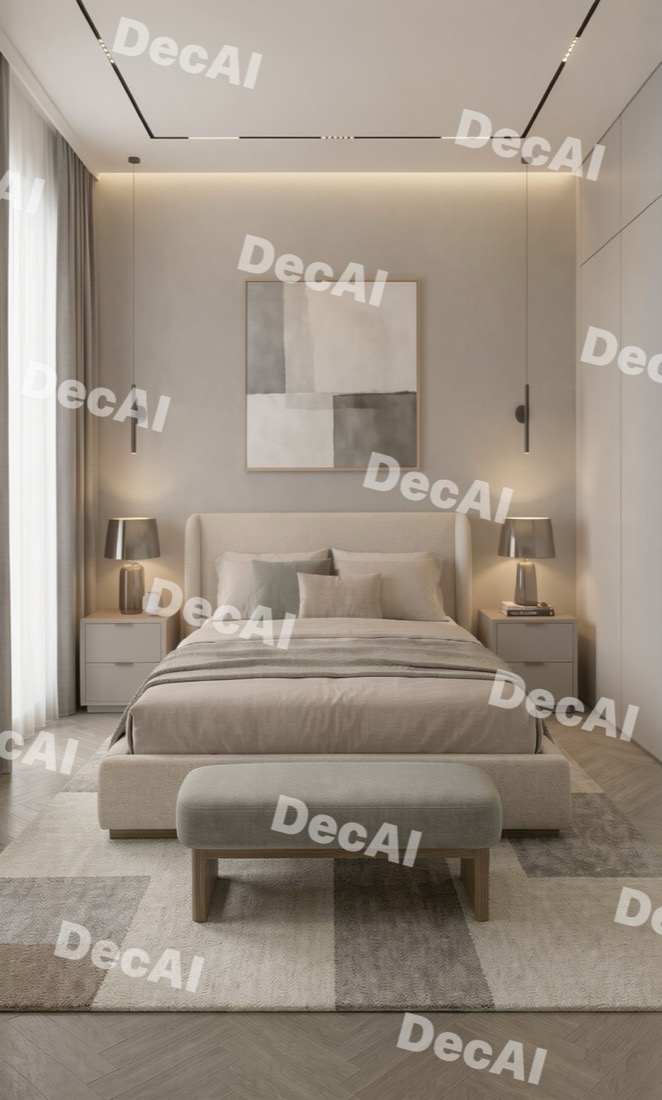
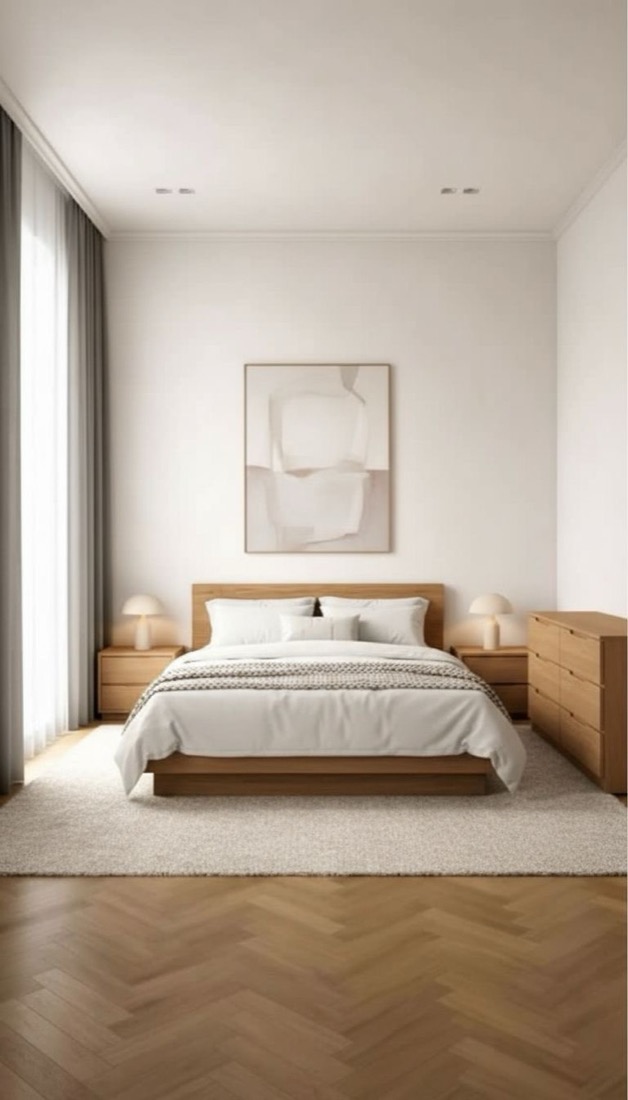
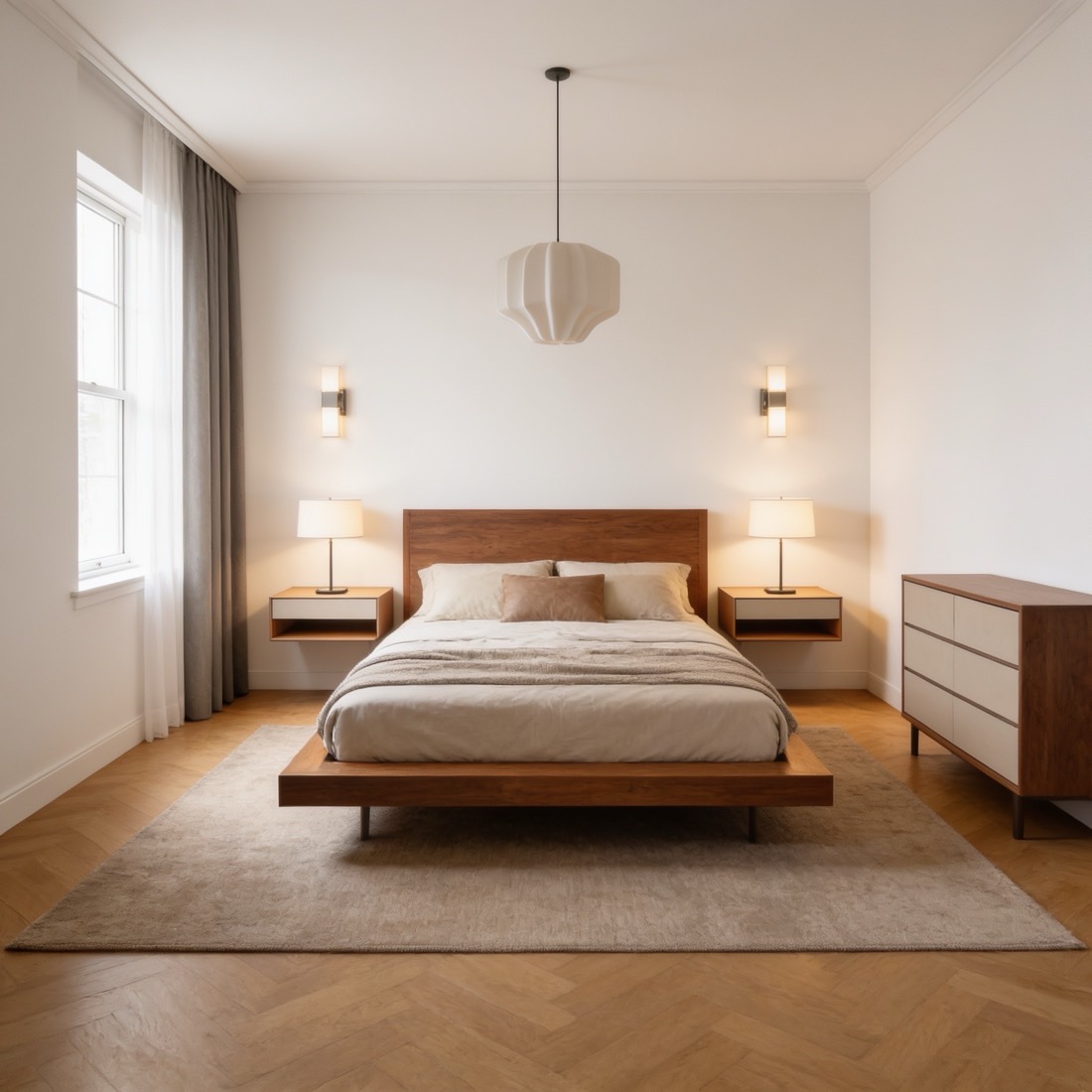
The scorecard
| App | Right room type? | Kept the real floor? | Notes |
|---|---|---|---|
| DecorIn | Yes | Yes — all three runs | All three runs landed in a similar calm register; see our weak points below |
| DecAI | Yes | No — lightened | Best-looking single image in the test |
| Decor | Yes | Partly | Much busier than requested; slowest app tested |
| Home AI (a) | No — living room | Roughly | Attractive render of the wrong room |
| Home AI (b) | No — no bed | No — marble tile | Gray wall and one plant; watermarked result |
| Remodel AI | No — living room | Roughly | Attractive render of the wrong room |
| Interior AI | No — still empty | Yes | Kept the room perfectly, because it changed nothing |
Round 1, September 2026. One empty room, the request "bedroom, modern" every time, three runs per app, free tier or standard path. Scored on room-type accuracy and whether the room's fixed surfaces survived — not on which picture is prettiest.
The floor question, which is the interesting one
When we started, we assumed an app leaving the floor untouched was being lazy. That is backwards, and it is worth spelling out because it is the thing most reviews get wrong.
If you live in the home, the floor is not on the table. You are restyling a room, not gutting it. You are going to buy a bed, a rug, some lamps and a coat of paint. You are not ripping up your flooring because an app suggested it.
So when an app hands you a beautiful room on a floor you do not own, it has quietly moved the goalposts. The picture is no longer a plan you can act on — it is a picture of somebody else's house. That is the difference between inspiration and a design, and it is the single most useful thing to check in any app you try.
Scroll back to the before photo and then look down at the floor in each result. The room has a warm wood herringbone parquet. DecorIn kept it in all three runs. DecAI lightened it. Home AI's second run replaced it with white marble tile. Those are three different answers to a question nobody asked out loud.
The honest exception: if you are mid-renovation and genuinely want to see new flooring, an app that changes it is doing what you want and one that locks it is in your way. Know which of the two you are before you judge the result.
Round 2: change one thing, touch nothing else
Everything above is about the whole room. But the request people actually bring to these apps is usually much smaller than that. What do I do with this alcove? What would a pantry look like there? What if that wall had shelving?
That is a harder problem than redesigning a room, because the correct answer has to leave everything else untouched. So we took a kitchen with one empty recess between two doorways and asked every app the same thing: put a pantry in that alcove.
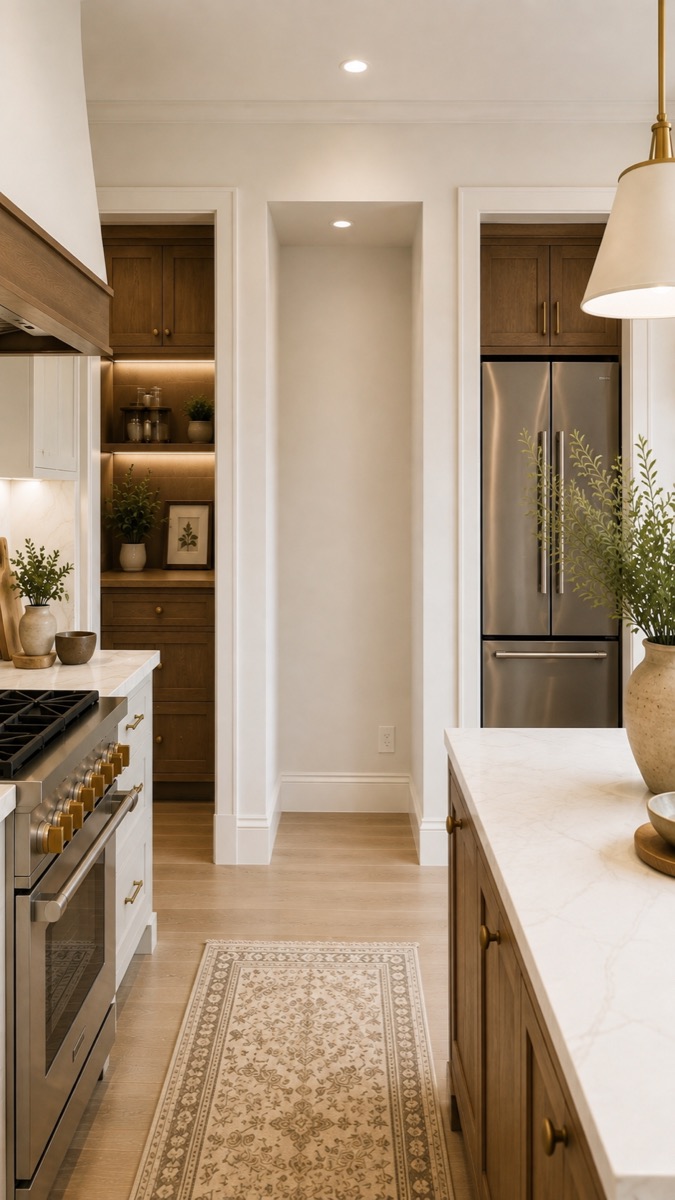
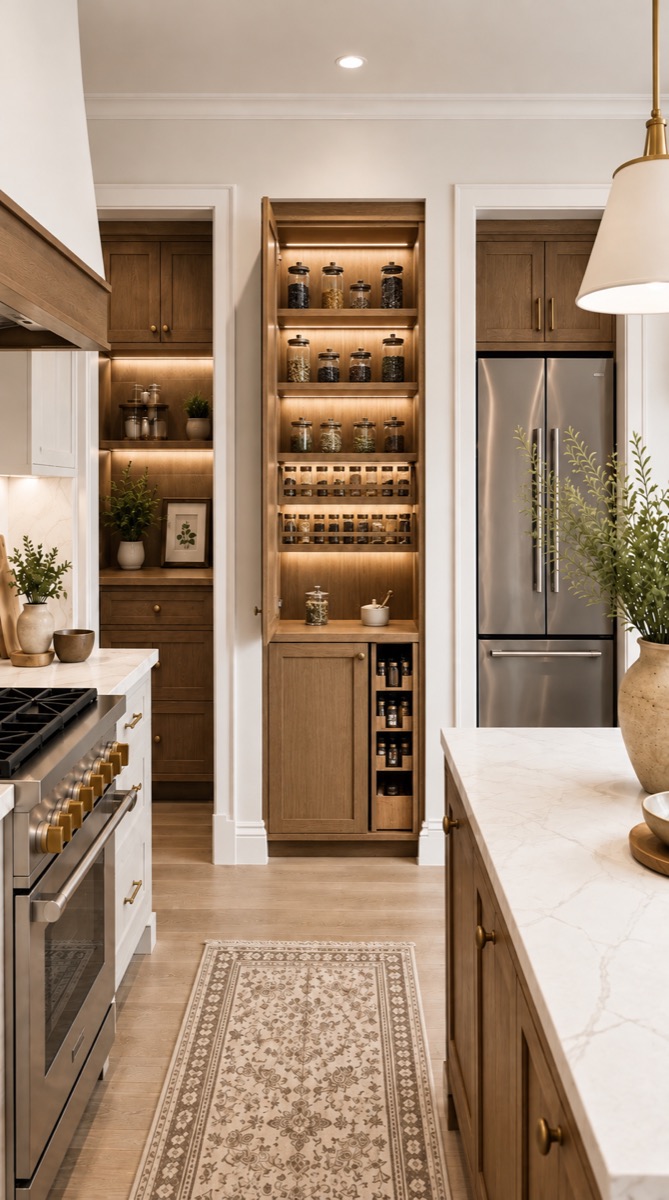
The rug is in the same place, the burners on the stove are identical, the plant on the island has not moved. Only the alcove is different.
What the other apps did with the same photo
Here is the finding, and it is not the one we expected. It is not that the other apps did this badly. It is that most of them do not have this as an option at all. What they offer is redesign the entire room — so that is what you get, whether or not it is what you asked for.
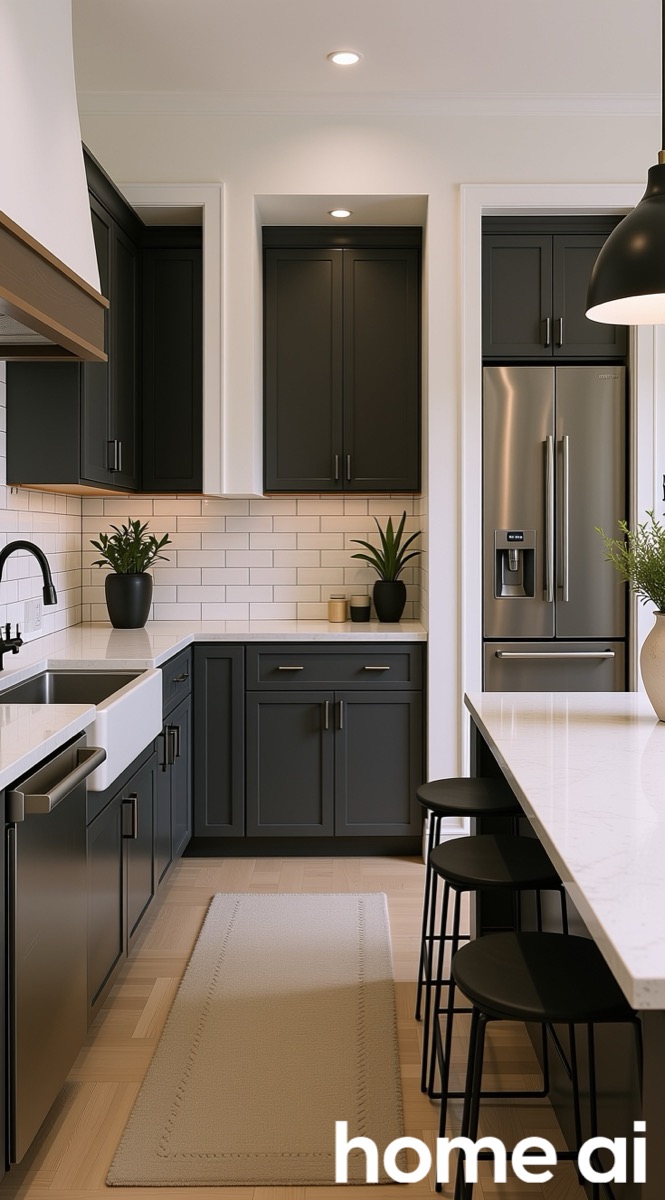
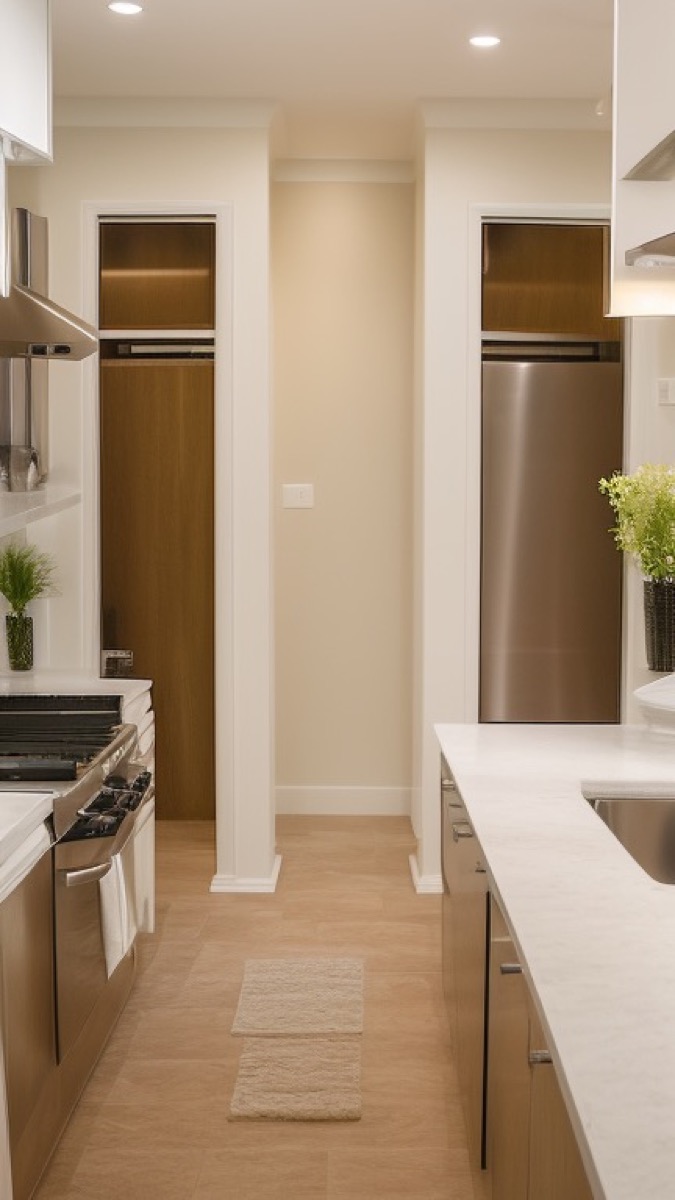
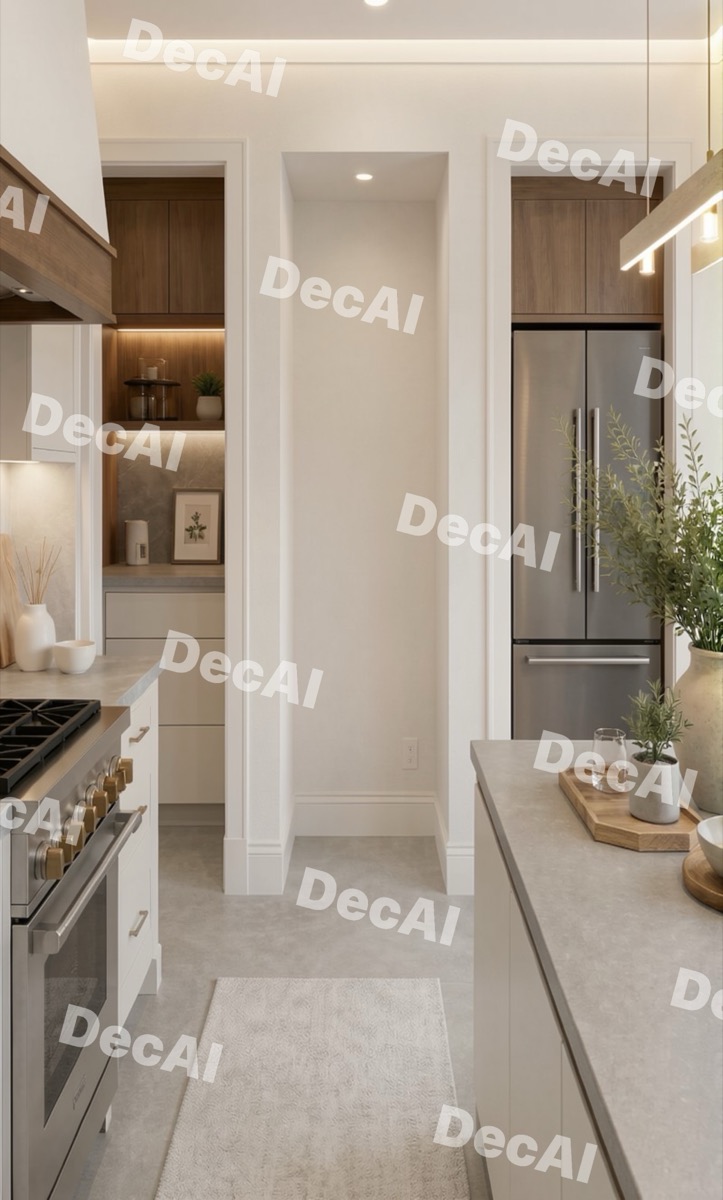
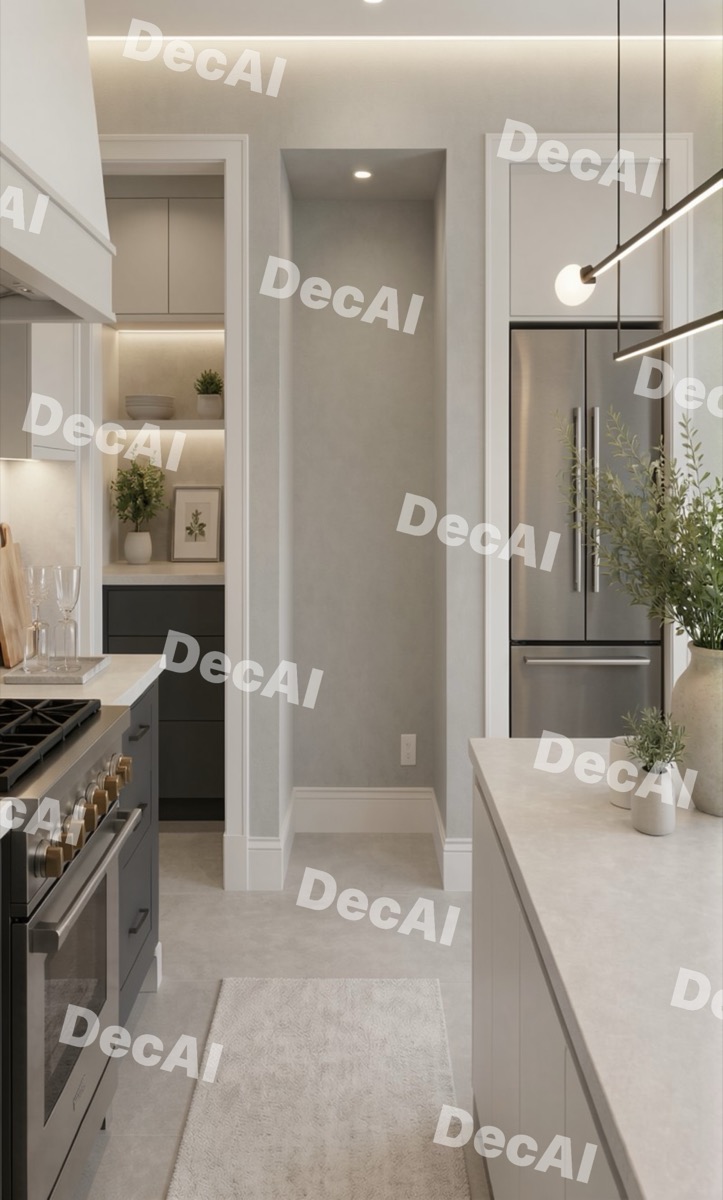
Two apps restyled the whole kitchen and left the alcove exactly as empty as they found it. One replaced the kitchen entirely. None of them were doing anything wrong by their own design — they were doing the only thing they offer.
The exception: DecorAI got close
DecorAI filled the alcove — open shelving, drawers underneath — and kept most of the kitchen recognisable. It is the one other app here that lets you aim at a specific area, and the best answer to this request other than ours. It did still restyle some cabinetry elsewhere in the room.
Why this happens
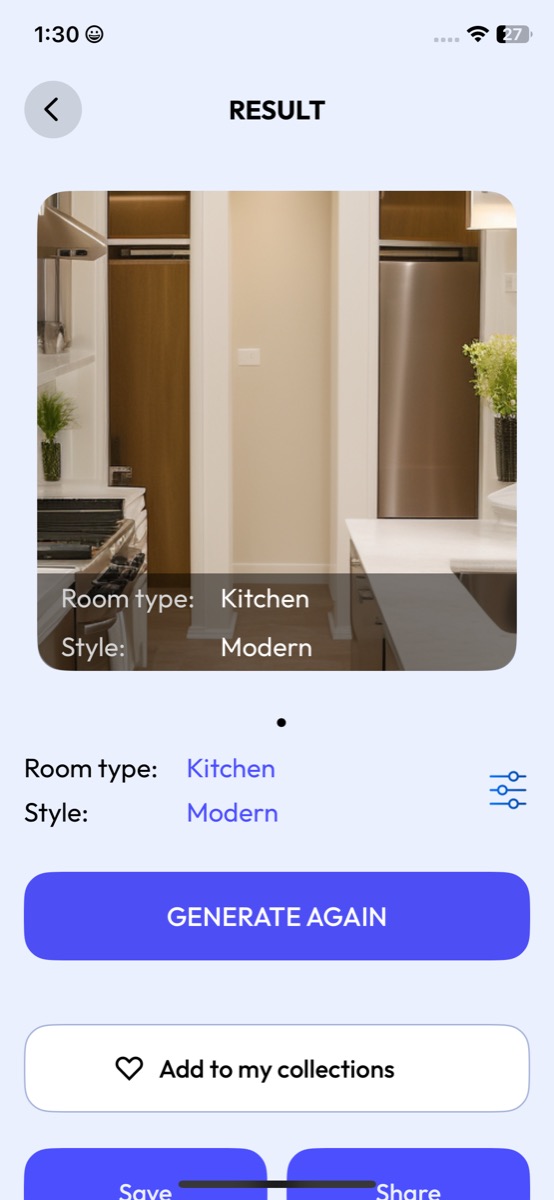
Look at what the apps actually let you specify. A room type and a style. That is the whole interface.
There is no field for "the recess on the left", no way to mark an area, no way to say leave the rest alone. The buttons are Generate again and Regenerate — roll the dice on the entire room one more time.
Some apps do have area tools of a kind — Home AI's result screen carries Replace, Paint and New Floor. But those are fixed jobs on fixed things. None of them is "describe what you want in this specific spot, and change nothing else."
So the honest version of the claim is not that these apps are bad at one-area edits. It is that for most of them it is not a feature, and a whole-room regeneration is the only lever you have.
| App | Alcove filled? | Rest of kitchen kept? | Can you target one area? |
|---|---|---|---|
| DecorIn | Yes — built pantry | Yes | Yes |
| DecorAI | Yes — open shelving | Mostly | Yes |
| Home AI | Became a cupboard | No — fully restyled | Fixed tools only |
| Interior AI | No | No — fully restyled | No — whole-room only |
| DecAI (2 runs) | No — both runs | No — fully restyled | No — whole-room only |
Round 2, September 2026. One kitchen photograph with an empty recess, same request to every app, free tier or standard path. Decor was not available for this round.
What DecorIn got wrong
We build DecorIn, so this section matters more than the rest of the page. Here is what our own app did badly in this test.
- Three runs, one mood. Like every app here, DecorIn was run three times. All three came back in a similar restrained, neutral direction — recognisably the same temperament each time. If you are generating again because you want something genuinely different, that is not enough variety, and we would rather say so than pretend it is a house style.
- Our first run was the plainest. The white-and-oak result is safe to the point of being forgettable; the walnut one is the better design by a distance. A user who stops after one attempt sees our weaker work.
- We did not beat DecAI on the single image. On pure visual appeal, DecAI's result is the nicest picture on this page. Ours is more faithful to the actual room. Those are different wins and we are not going to blur them into one.
- One room is still one room. Three runs each removes the luck, but it does not make this a broad test. Our app got the room type right on an easy, empty space. On a harder room — a dark one, an awkward-shaped one, one already full of furniture — it may not. We have not proven otherwise yet.
Run the same test yourself
Upload your room, look at the floor and the windows in the result, and decide whether the app redesigned your space or invented a new one. Free to try, no signup.
Redesign a room freeWhat we test next
Rounds 1 and 2 are above. We are not going to pretend two rooms settle anything. The same fixed rules are being run on:
- A living room
- A kitchen
- A small bathroom
- A dark or awkward-shaped room
The specific thing we are watching: does the wrong-room-type failure repeat? If Home AI and Remodel AI hand back a living room again when we ask for a kitchen, that is a pattern worth knowing about. If it only happened once, it was bad luck and we will say that here in plain words.
Results get added to this page as they are run, with the date on each round. If you think we got something wrong, or you run the same test and get a different outcome, tell us — corrections go on the page.
FAQ
Do AI interior design apps actually redesign your room?
Often they do not. In this test we uploaded one empty room and asked six apps for a modern bedroom. Two returned a living room with sofas, and one returned the empty room unchanged. Many tools generate a new room loosely inspired by your photo rather than furnishing the room you uploaded.
Should an AI design app change my floor?
Usually not. If you are restyling rather than renovating, the floor is a fixed cost you will not replace, so an app that swaps it is showing you a room you do not have. Replacing the floor only helps if you are actively planning a renovation.
Which app kept the room most accurate?
DecorIn and DecAI both returned a genuine bedroom. DecorIn kept the original wood floor across all three runs. DecAI produced the best-looking single image but replaced the floor. Decor returned a bedroom but busier than requested, and was the slowest app tested.
Is one room enough to judge an app?
No. Running each app three times removes the possibility that a bad result was luck, but it is still one room, and an easy one. We are repeating the same test on a living room, kitchen, bathroom and a dark awkward room, and will publish those results here.
Can AI design apps change just one part of a room?
Mostly not. In our round 2 test we asked six apps to put a pantry in one empty alcove and leave the rest of the kitchen alone. Most offer only a room type and a style, so they regenerate the whole room — two restyled everything and left the alcove empty. DecorAI did fill it, and DecorIn changed the alcove while keeping the rest of the kitchen unchanged.
Is this test biased? You make one of the apps.
We make DecorIn, which is why the rules were fixed before we started, why the raw images are all on this page including the weak ones, and why our own app's faults have their own section. Read the images rather than our scores, and run the same test yourself — it takes about ten minutes.
Round 1 conducted September 2026 on a single empty-room photograph. Each app run three times with room type set to Bedroom and style set to Modern, on its free tier or standard path; representative results shown. Competitor watermarks left intact. Product names and images belong to their respective owners and are shown for comparison. Apps change frequently; results from a later date may differ.